> ## Documentation Index
> Fetch the complete documentation index at: https://docs.sendkit.dev/llms.txt
> Use this file to discover all available pages before exploring further.
# BIMI
> Display your brand logo next to your emails in recipients' inboxes with BIMI.
## What is BIMI?
BIMI (Brand Indicators for Message Identification) is an email standard that lets you display your brand's logo next to your emails in the recipient's inbox. Instead of a generic avatar or initials, recipients see your actual logo — making your emails instantly recognizable.
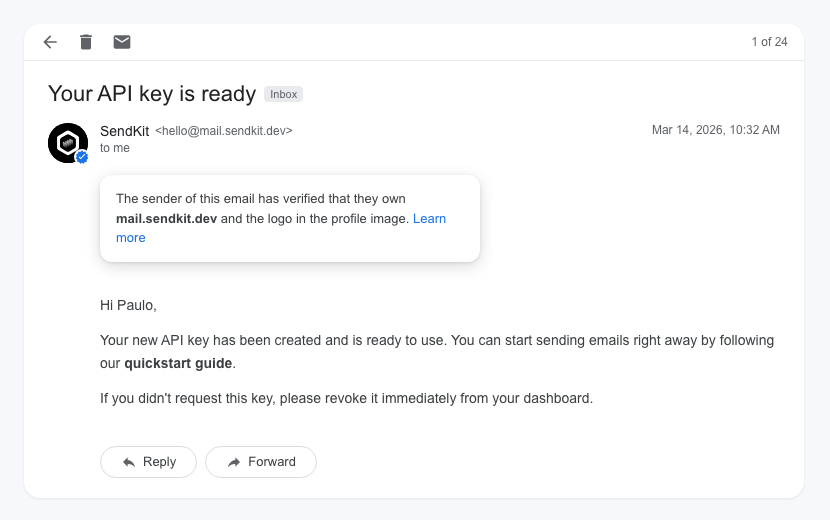 BIMI is a visual trust signal. It shows recipients that the email is legitimately from your organization and has passed email authentication checks.
## How BIMI works
BIMI builds on top of DMARC. Here's the chain of trust:
1. **SPF and DKIM** authenticate the email
2. **DMARC** enforces a policy (`quarantine` or `reject`) on failing emails
3. **BIMI** tells the email client where to find your logo
4. The email client verifies the DMARC policy is enforced, then displays the logo
Without a strong DMARC policy, BIMI won't work. This is by design — BIMI is a reward for properly authenticating your email.
```
SPF + DKIM → DMARC (quarantine or reject) → BIMI → Logo displayed
```
## Prerequisites
Before implementing BIMI, you need:
1. **A verified domain** in SendKit with SPF and DKIM passing
2. **A DMARC record** with `p=quarantine` or `p=reject` at `pct=100`. See the [DMARC guide](/academy/domains/dmarc)
3. **A logo** in SVG Tiny PS format (more details below)
4. **A mark certificate** (VMC or CMC) from a supported certificate authority
## Email client support
Not all email clients support BIMI. Here's the current support:
| Email client | VMC (Verified Mark Certificate) | CMC (Common Mark Certificate) |
| ----------------- | ------------------------------- | ----------------------------- |
| **Gmail** | Yes | Yes |
| **Apple Mail** | Yes | Yes |
| **Yahoo Mail** | Yes | Yes |
| **Outlook (new)** | Coming soon | Coming soon |
VMC requires a registered trademark. CMC is an alternative for organizations without a trademark — it requires demonstrating at least one year of consistent logo use.
## Implementing BIMI
### Step 1: Enforce DMARC
Your DMARC record must have `p=quarantine` or `p=reject` with `pct=100` (all emails). If you're still on `p=none`, follow the [DMARC guide](/academy/domains/dmarc) to upgrade your policy first.
```
v=DMARC1; p=reject; rua=mailto:dmarc@yourdomain.com;
```
### Step 2: Prepare your logo
Your logo must meet these requirements:
* **Format**: SVG Tiny PS (Portable/Secure) — a specific subset of SVG
* **Shape**: Square aspect ratio
* **Background**: Solid, non-transparent background (the logo will be displayed in a circle or square depending on the email client)
* **Size**: Keep it under 32 KB
A regular SVG file won't work. It must be specifically in the SVG Tiny PS format. Most certificate authorities provide tools to convert your logo.
Host the SVG file on your web server over HTTPS. For example: `https://acme.com/brand/logo.svg`
### Step 3: Obtain a mark certificate
A mark certificate proves that you own the logo. There are two types:
**VMC (Verified Mark Certificate)** — requires a registered trademark with an intellectual property office recognized by the certificate authority.
**CMC (Common Mark Certificate)** — for organizations without a registered trademark. Requires demonstrating at least one year of consistent, visible use of the logo.
You can obtain certificates from:
* DigiCert
* GlobalSign
* SSL.com
The certificate authority will validate your logo ownership and issue a PEM certificate file. Host it on your web server over HTTPS alongside your logo.
### Step 4: Add the BIMI DNS record
Add a TXT record to your DNS:
| Field | Value |
| --------- | --------------------------------------------------------------------------------------- |
| **Type** | TXT |
| **Name** | `default._bimi.yourdomain.com` |
| **Value** | `v=BIMI1; l=https://acme.com/brand/logo.svg; a=https://acme.com/brand/certificate.pem;` |
| **TTL** | 3600 |
Replace the URLs with your actual logo and certificate locations.
## BIMI record parameters
| Parameter | Required | Description |
| --------- | -------- | ---------------------------------------------------------------- |
| `v` | Yes | Version. Always `BIMI1` |
| `l` | Yes | URL to your logo in SVG Tiny PS format (must be HTTPS) |
| `a` | Yes | URL to your VMC or CMC certificate in PEM format (must be HTTPS) |
## Verifying your BIMI record
After adding the DNS record, it may take a few days for email clients to start displaying your logo. You can verify your setup by:
1. Sending a test email to a Gmail or Yahoo address
2. Checking the email headers for `bimi=pass` in the `Authentication-Results`
3. Looking for your logo next to the email in the inbox
Gmail may cache BIMI lookups. If your logo doesn't appear immediately, wait 24–48 hours and try again.
## FAQ
The DNS record is free. However, you need a mark certificate (VMC or CMC), which is a paid certificate from a certificate authority. Prices vary by provider.
Not necessarily. A VMC requires a registered trademark, but a CMC only requires one year of demonstrated logo use. The CMC option makes BIMI accessible to smaller organizations.
BIMI won't work. Email clients require `p=quarantine` or `p=reject` at `pct=100` before they'll display BIMI logos. This ensures that only properly authenticated senders can show their logo.
BIMI supports selectors, so you could in theory use different logos. In practice, most organizations use a single `default` selector with one logo for consistency.
BIMI is a visual trust signal. It shows recipients that the email is legitimately from your organization and has passed email authentication checks.
## How BIMI works
BIMI builds on top of DMARC. Here's the chain of trust:
1. **SPF and DKIM** authenticate the email
2. **DMARC** enforces a policy (`quarantine` or `reject`) on failing emails
3. **BIMI** tells the email client where to find your logo
4. The email client verifies the DMARC policy is enforced, then displays the logo
Without a strong DMARC policy, BIMI won't work. This is by design — BIMI is a reward for properly authenticating your email.
```
SPF + DKIM → DMARC (quarantine or reject) → BIMI → Logo displayed
```
## Prerequisites
Before implementing BIMI, you need:
1. **A verified domain** in SendKit with SPF and DKIM passing
2. **A DMARC record** with `p=quarantine` or `p=reject` at `pct=100`. See the [DMARC guide](/academy/domains/dmarc)
3. **A logo** in SVG Tiny PS format (more details below)
4. **A mark certificate** (VMC or CMC) from a supported certificate authority
## Email client support
Not all email clients support BIMI. Here's the current support:
| Email client | VMC (Verified Mark Certificate) | CMC (Common Mark Certificate) |
| ----------------- | ------------------------------- | ----------------------------- |
| **Gmail** | Yes | Yes |
| **Apple Mail** | Yes | Yes |
| **Yahoo Mail** | Yes | Yes |
| **Outlook (new)** | Coming soon | Coming soon |
VMC requires a registered trademark. CMC is an alternative for organizations without a trademark — it requires demonstrating at least one year of consistent logo use.
## Implementing BIMI
### Step 1: Enforce DMARC
Your DMARC record must have `p=quarantine` or `p=reject` with `pct=100` (all emails). If you're still on `p=none`, follow the [DMARC guide](/academy/domains/dmarc) to upgrade your policy first.
```
v=DMARC1; p=reject; rua=mailto:dmarc@yourdomain.com;
```
### Step 2: Prepare your logo
Your logo must meet these requirements:
* **Format**: SVG Tiny PS (Portable/Secure) — a specific subset of SVG
* **Shape**: Square aspect ratio
* **Background**: Solid, non-transparent background (the logo will be displayed in a circle or square depending on the email client)
* **Size**: Keep it under 32 KB
A regular SVG file won't work. It must be specifically in the SVG Tiny PS format. Most certificate authorities provide tools to convert your logo.
Host the SVG file on your web server over HTTPS. For example: `https://acme.com/brand/logo.svg`
### Step 3: Obtain a mark certificate
A mark certificate proves that you own the logo. There are two types:
**VMC (Verified Mark Certificate)** — requires a registered trademark with an intellectual property office recognized by the certificate authority.
**CMC (Common Mark Certificate)** — for organizations without a registered trademark. Requires demonstrating at least one year of consistent, visible use of the logo.
You can obtain certificates from:
* DigiCert
* GlobalSign
* SSL.com
The certificate authority will validate your logo ownership and issue a PEM certificate file. Host it on your web server over HTTPS alongside your logo.
### Step 4: Add the BIMI DNS record
Add a TXT record to your DNS:
| Field | Value |
| --------- | --------------------------------------------------------------------------------------- |
| **Type** | TXT |
| **Name** | `default._bimi.yourdomain.com` |
| **Value** | `v=BIMI1; l=https://acme.com/brand/logo.svg; a=https://acme.com/brand/certificate.pem;` |
| **TTL** | 3600 |
Replace the URLs with your actual logo and certificate locations.
## BIMI record parameters
| Parameter | Required | Description |
| --------- | -------- | ---------------------------------------------------------------- |
| `v` | Yes | Version. Always `BIMI1` |
| `l` | Yes | URL to your logo in SVG Tiny PS format (must be HTTPS) |
| `a` | Yes | URL to your VMC or CMC certificate in PEM format (must be HTTPS) |
## Verifying your BIMI record
After adding the DNS record, it may take a few days for email clients to start displaying your logo. You can verify your setup by:
1. Sending a test email to a Gmail or Yahoo address
2. Checking the email headers for `bimi=pass` in the `Authentication-Results`
3. Looking for your logo next to the email in the inbox
Gmail may cache BIMI lookups. If your logo doesn't appear immediately, wait 24–48 hours and try again.
## FAQ
The DNS record is free. However, you need a mark certificate (VMC or CMC), which is a paid certificate from a certificate authority. Prices vary by provider.
Not necessarily. A VMC requires a registered trademark, but a CMC only requires one year of demonstrated logo use. The CMC option makes BIMI accessible to smaller organizations.
BIMI won't work. Email clients require `p=quarantine` or `p=reject` at `pct=100` before they'll display BIMI logos. This ensures that only properly authenticated senders can show their logo.
BIMI supports selectors, so you could in theory use different logos. In practice, most organizations use a single `default` selector with one logo for consistency.